Netspeed只是一款小GNOME环境不错的小程序,显示了如何在一个特定的流量发生网络设备(例如eth0的),它可以作为一个 Gnome Applet 放置在面板上来实时显示当前的详细信息及网络流量。
主页: http://projects.gnome.org/netspeed/
Ubuntu 10.04下可以通过 PPA 源来安装实时显示当前网络流量工具NetSpeed:
sudo add-apt-repository ppa:ferramroberto/linuxfreedomlucid && sudo apt-get update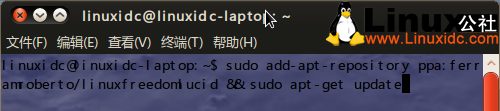
图1
sudo apt-get install netspeed

图2
或者直接下载 Deb 包来安装:32 位:https://launchpad.net/~ferramroberto/+archive/linuxfreedomlucid/+files/netspeed_0.16.0-1~lffl~lucid~ppa_i386.deb
64 位:https://launchpad.net/~ferramroberto/+archive/linuxfreedomlucid/+files/netspeed_0.16.0-1~lffl~lucid~ppa_i386.deb