操作环境:VMware+CentOS5.0
实验目的:为CentOS5.0系统添加一块新磁盘,并mount到md目录下
实验过程:
步骤1:从VMare虚拟添加一块8G的磁盘
菜单中选择VM-->Settings,出现如下对话框(也可双击device界面)??
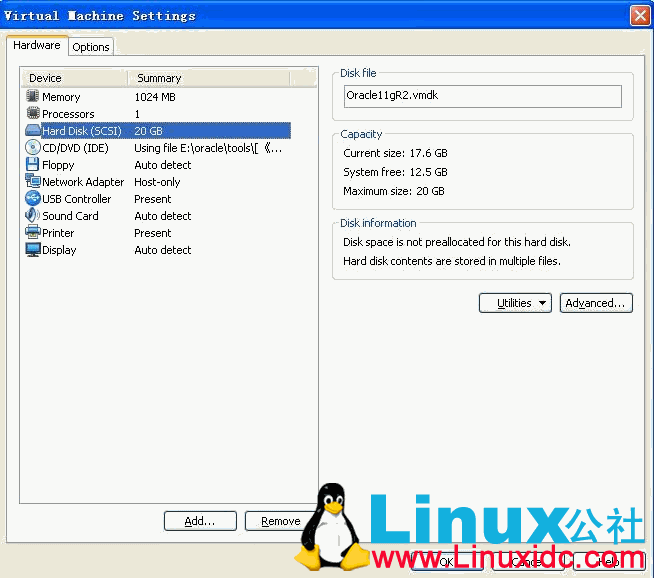
按照提示做如下操作:选择Add---> Hard Disk--->Create a new virtual disk---->next---->select a type(scsi)--->capity--->ok
第二步:启动虚拟机,在Unix系统中添加磁盘,并划分为一个分区
[plain]- [root@Oracle11gR2 ~]# cd /dev/ [root@oracle11gR2 dev]# ls
- adsp fd0 fd0u820 loop1 mixer pts ram5 sdb tty0 tty20 tty32 tty44 tty56 ttyS1 vcs5 agpgart fd0u1040 fd0u830 loop2 net ram ram6 sequencer tty1 tty21 tty33 tty45 tty57 ttyS2 vcs6
- audio fd0u1120 floppy loop3 null ram0 ram7 sequencer2 tty10 tty22 tty34 tty46 tty58 ttyS3 vcsa autofs fd0u1440 floppy-fd0 loop4 nvram ram1 ram8 sg0 tty11 tty23 tty35 tty47 tty59 urandom vcsa1
- bus fd0u1680 full loop5 oldmem ram10 ram9 sg1 tty12 tty24 tty36 tty48 tty6 usbdev1.1_ep00 vcsa2 cdrom fd0u1722 gpmctl loop6 par0 ram11 ramdisk shm tty13 tty25 tty37 tty49 tty60 usbdev1.1_ep81 vcsa3
- cdrom-hdc fd0u1743 hdc loop7 parport0 ram12 random snapshot tty14 tty26 tty38 tty5 tty61 usbdev1.2_ep00 vcsa4 console fd0u1760 hpet lp0 parport1 ram13 rawctl snd tty15 tty27 tty39 tty50 tty62 usbdev1.2_ep81 vcsa5
- core fd0u1840 initctl MAKEDEV parport2 ram14 root stderr tty16 tty28 tty4 tty51 tty63 vcs vcsa6 disk fd0u1920 input mapper parport3 ram15 rtc stdin tty17 tty29 tty40 tty52 tty7 vcs1 X0R
- dmmidi fd0u360 kmsg md0 port ram2 sda stdout tty18 tty3 tty41 tty53 tty8 vcs2 zero dsp fd0u720 log mem ppp ram3 sda1 systty tty19 tty30 tty42 tty54 tty9 vcs3
- fd fd0u800 loop0 midi ptmx ram4 sda2 tty tty2 tty31 tty43 tty55 ttyS0 vcs4 [root@oracle11gR2 dev]# fdisk /dev/sdb
- Device contains neither a valid DOS partition table, nor Sun, SGI or OSF disklabel Building a new DOS disklabel. Changes will remain in memory only,
- until you decide to write them. After that, of course, the previous content won't be recoverable.
- The number of cylinders for this disk is set to 1044. There is nothing wrong with that, but this is larger than 1024,
- and could in certain setups cause problems with: 1) software that runs at boot time (e.g., old versions of LILO)
- 2) booting and partitioning software from other OSs (e.g., DOS FDISK, OS/2 FDISK)
- Warning: invalid flag 0x0000 of partition table 4 will be corrected by w(rite)
- Command (m for help): m Command action
- a toggle a bootable flag b edit bsd disklabel
- c toggle the dos compatibility flag d delete a partition
- l list known partition types m print this menu
- n add a new partition o create a new empty DOS partition table
- p print the partition table q quit without saving changes
- s create a new empty Sun disklabel t change a partition's system id
- u change display/entry units v verify the partition table
- w write table to disk and exit x extra functionality (experts only)
- Command (m for help): p
- Disk /dev/sdb: 8589 MB, 8589934592 bytes
- 255 heads, 63 sectors/track, 1044 cylinders Units = cylinders of 16065 * 512 = 8225280 bytes
- Device Boot Start End Blocks Id System
- Command (m for help): n
- Command action e extended
- p primary partition (1-4) p
- Partition number (1-4): 1 First cylinder (1-1044, default 1): 1
- Last cylinder or +size or +sizeM or +sizeK (1-1044, default 1044): 1044
- Command (m for help): p
- Disk /dev/sdb: 8589 MB, 8589934592 bytes 255 heads, 63 sectors/track, 1044 cylinders
- Units = cylinders of 16065 * 512 = 8225280 bytes
- Device Boot Start End Blocks Id System /dev/sdb1 1 1044 8385898+ 83 Linux
- Command (m for help): m
- Command action a toggle a bootable flag
- b edit bsd disklabel c toggle the dos compatibility flag
- d delete a partition l list known partition types
- m print this menu n add a new partition
- o create a new empty DOS partition table p print the partition table
- q quit without saving changes s create a new empty Sun disklabel
- t change a partition's system id u change display/entry units
- v verify the partition table w write table to disk and exit
- x extra functionality (experts only)
- Command (m for help): w The partition table has been altered!
- Calling ioctl() to re-read partition table.
- Syncing disks. [root@oracle11gR2 dev]#