安装步骤
如果在虚拟机下安装64位linux系统时,需要对bios进行一下设置。
而且必须先看看机器是否支持64位系统。
用CPU-Z查看,intel处理器查看如下(指令集需要支持EM64T,VT-x):
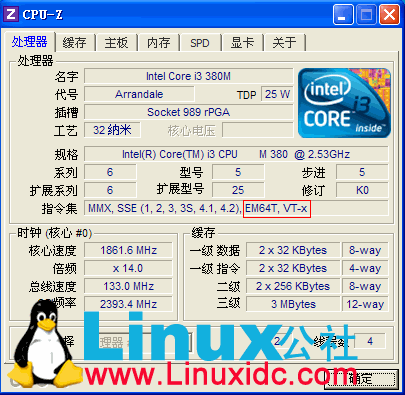
AMD处理器查看如下(指令集需要支持x86_64,AMD-V):

设置BIOS,Virtualization Technology 为 enabled 后,保存。
保存好修改后的BIOS后,需要冷启动一下,即:关机,再开机。这样这个设置才生效,要不然仍然无法生效。这个一定要注意,直接通过重启Windows无法达到这个目的的。cold rebooting the machine.
详细:
BIOS Setup Utility
Config ==> CPU ==> Intel(R) Virtualization Technology ==> 设置为 Enabled
When enabled, a VMM can utilize the additional hardwar capabilities provided by Intel(R) Virtualization Technology.
NOTE
=======
After any change in this option, system must be powered off to take effect.
此文章由 http://www.ositren.com 收集整理 ,地址为: http://www.ositren.com/htmls/58256.html