1. insight下载地址 http://sourceware.org/insight/downloads.php
2. 解压到Ubuntu中,我解压的目录如下:
/home/haowei/Downloads/insight-6.8-1
3. 进入insight-6-8-1目录,执行./configure命令
4. 在执行make命令,编译的时候会出现异常信息:
-
cc1:warning being treated as errors
linux-nat.c: In function 'linux_nat_info_proc_cmd':
linux-nat.c:2879:error:ignoring return value of 'fgets',declared with attribute warn_unused_result
查看gdb/linux-nat.c的函数'linux_nat_info_proc_cmd':
这是因为 该函数中调用的fgets方法,没有定义返回值。
源码如下:
-
if ((procfile = fopen (fname1, "r")) != NULL)
{
fgets (buffer, sizeof (buffer), procfile);
printf_filtered ("cmdline = '%s'\n", buffer);
fclose (procfile);
}
修改后的代码:
-
if ((procfile = fopen (fname1, "r")) != NULL)
{
char * p=fgets (buffer, sizeof (buffer), procfile);
printf_filtered ("cmdline = '%s'\n", buffer);
fclose (procfile);
}
类似的错误还有好几处,涉及到的方法:write,getcwd,dup...
具体到哪个文件,执行make的时候会有提示的。
修改的时候给这些方法调用定义个返回值即可:
int p = write(....);
char * p=getcwd(....);
int p = dup(...);
注意,这些变量的定义应该放在函数内部的最前面。
另外还有一个gdb/eval.c的类,这个代码编译报错是因为:
int subscript_array[MAX_FORTRAN_DIMS];
这个数组没有初始化,给这个数组初始化即可编译通过:
-
if (nargs > MAX_FORTRAN_DIMS)
error (_("Too many subscripts for F77 (%d Max)"), MAX_FORTRAN_DIMS);
memset(&subscript_array,0,sizeof(subscript_array));
5. make执行完成之后,在执行sudo make install 即可完成安装。
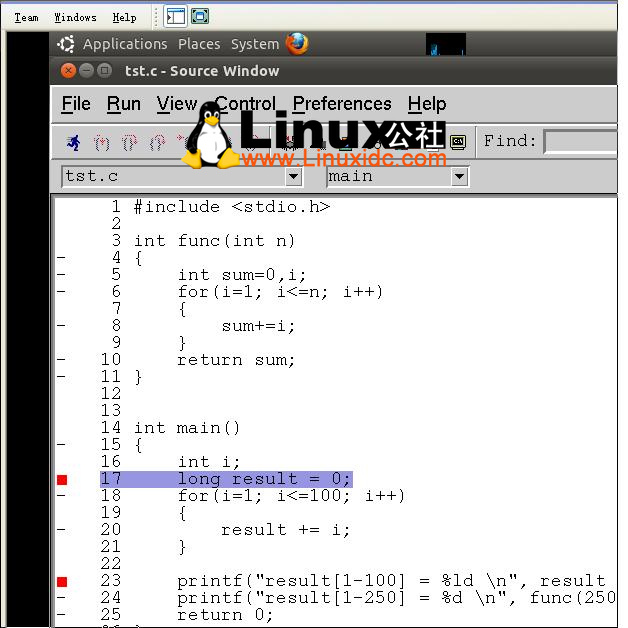
附图一张,这是我编译完成之后,insight运行程序的截图:
此文章由 http://www.ositren.com 收集整理 ,地址为: http://www.ositren.com/htmls/58881.html