给出虚假的路由信息,把所有的信息流都重定向到一个不存在的主机;
自动将对服务器进行端口扫描的主机加到TCP-Wrappers的/etc/hosts.deny文件中去,我个人比较喜欢这种方式,因为线上许多环境并非都能打开iptables,这个选项也是PortSentry默认的功能;
利用Netfilter机制,用包过滤程序,比如iptables和ipchain等,把所有非法数据包(来自对服务器进行端口扫描的主机)都过滤掉;
通过syslog()函数给出一个目志消息,甚至可以返回给扫描者一段警告信息。
一、PortSentry的安装
下面详细介绍PortSentry工具的安装和配置方法。
1.从http://sourceforge.net/projects/sentrytools/下载软件的最新版portsentry-1.2.tar.gz,用root用户执行如下命令进行安装:
#tar zxvf portsentry-1.2.tar.gz
#cd portsentry-1.2_beta
#make
#make install
进行到这步时发现报错,系统生成不了protsentry执行文件,【 Linux公社 www.Linuxidc.com 】 我们查看Makefile文件时发现,make后面根据操作系统的不同有许多选项。
所以我们重新执行此步操作,将目录删除重新解压缩
然后我们执行make linux,发现系统仍然报错,如下:
SYSTYPE=linux
Making
cc -O -Wall -DLINUX -DSUPPORT_STEALTH -o ./portsentry ./portsentry.c \
./portsentry_io.c ./portsentry_util.c
./portsentry.c: In function ?.ortSentryModeTCP?.
./portsentry.c:1187: warning: pointer targets in passing argument 3 of ?.ccept?.differ in signedness
./portsentry.c: In function ?.ortSentryModeUDP?.
./portsentry.c:1384: warning: pointer targets in passing argument 6 of ?.ecvfrom?.differ in signedness
./portsentry.c: In function ?.sage?.
./portsentry.c:1584: error: missing terminating " character
./portsentry.c:1585: error: ?.ourceforget?.undeclared (first use in this function)
./portsentry.c:1585: error: (Each undeclared identifier is reported only once
./portsentry.c:1585: error: for each function it appears in.)
./portsentry.c:1585: error: expected ?.?.before ?.ot?
./portsentry.c:1585: error: stray ?.?.in program
./portsentry.c:1585: error: missing terminating " character
./portsentry.c:1595: error: expected ?.?.before ?.?.token
make: *** [linux] Error 1
解决方法:
我们打开portsentry.c文件,在1590行左右,我们将带有Copyright 1997-2003字样的那行调整为一行即可,如下图所示
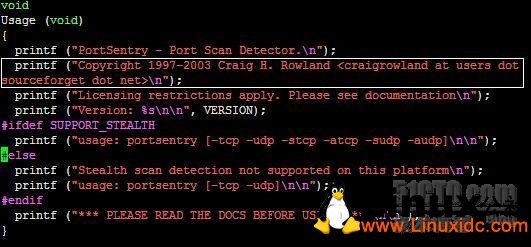
图1-1 文字有白线标记的那行代码应调整为一行
调整后我们再执行make linux&& make install后,PortSentry顺利安装成功,其安装路径为/usr/local/psionic/portsentry,如下所示表示成功安装此软件:
Edit /usr/local/psionic/portsentry/portsentry.conf and change
your settings if you haven't already. (route, etc)
WARNING: This version and above now use a new
directory structure for storing the program
and config files (/usr/local/psionic/portsentry).
Please make sure you delete the old files when
the testing of this install is complete.
此文章由 http://www.ositren.com 收集整理 ,地址为: http://www.ositren.com/htmls/59816.html