Download
- 安装包(Linux source) : openssl-
- 在linux下解压缩下载到的安装包,命令如下.....
tar -xzf openssl-xxx.tar.gzOur Configuration
- Install to : /usr/local/ssl
- Module type : dynamically and staticly loaded modules, *.so *.a
Build Instructions
Configure
.../openssl-0.
- --prefix=/usr/local/ssl-
[this is the installation location; default is '/usr/local/ssl' -- which we will symlink] - shared
[in addition to the usual static libraries, create shared libraries] - zlib-dynamic
[like "zlib", but has OpenSSL load the zlib library dynamically when needed] - enable-camellia
[enables the symmetric cipher 'Camellia' (128-bit, 192-bit, 256-bit key versions), which is now available for royalty-free use]display guess on system made by './config'...
.../openssl-0.
Build and Install
- .../openssl-0.
[step required since extra cipher was enabled] - .../openssl-0.
- .../openssl-0.
- .../openssl-0.
Symlink
Form symlink from '/usr/local/ssl-
- ...]# cd /usr/local
- /usr/local]# ln -s ssl-
Update the Run-time Linker
ld.so.cache will need to be updated with the location of the new OpenSSL shared libs: libcrypto.so.
Sometimes it is sufficient to just symlink or copy these two files to /lib, but we recommend you follow these instructions instead.
Edit /etc/ld.so.conf, add to paths...(修改效果如下图1,当然也可以直接在/etc/ld.so.conf.d文件夹下再创建一个.conf文件,把/usr/local/ssl/lib拷贝到里面,另外也可以在现有的.conf文件中添加这个路径,反正ld.so.conf中包含了这个文件夹下的所有.conf文件)
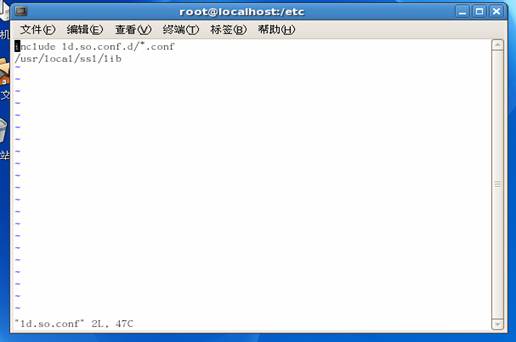
图1
/usr/local/ssl/lib
Update the run-time linker...
...]# ldconfig
Update the PATH
Edit /root/.bash_profile, add to PATH variable...
(若原来没有安装openssl的旧版本,则放在PATH中的任何位置都可以,但是记住要用冒号分隔开,而不是分号分隔,详见后面的截图,若想查看当前的PATH环境变量都设置了什么,可以使用如下的命令实现:
[root@localhost local]# echo $PATH
/usr/local/ssl/bin:/usr/lib/qt-3.3/bin:/usr/kerberos/sbin:/usr/kerberos/bin:/usr/local/sbin:/usr/local/bin:/sbin:/bin:/usr/sbin:/usr/bin:/usr/X11R6/bin:/root/bin
)
NOTE:一般在root下直接是看不见.bash_profile(一般为隐藏文件)的,可以在该目录下使用ls –a 命令来显示隐藏了的文件。然后用VI或emacs编辑器来修改其中的内容。编译完成后若要立刻看到效果,可以用命令:source .bash_profile ,若要长期起作用,需要重新登录(当我首次安装的时候是出现的情况是这样的~~~
/usr/local/ssl/bin
Re-login.
[sanity check] OpenSSL
Verify that binary 'openssl' is linking against the correct ssl libraries...
- [root@localhost /]# cd /usr/local
- [root@localhost local]# ldd /usr/local/ssl/bin/openssl
- linux-gate.so.1 => (0x
- libssl.so.
- libcrypto.so.
- libdl.so.2 => /lib/libdl.so.2 (0x005b2000)
- libc.so.6 => /lib/libc.so.6 (0x00447000)
- /lib/ld-linux.so.2 (0x
...]# which openssl
/usr/local/ssl/bin/openssl
...]# openssl version
OpenSSL
If another path, or an older version is shown, your system contains a previously installed OpenSSL that is first [relative to the newer openssl] in the path.
Repeate the steps in section 'Update the PATH', except place the specified location at the start of the PATH variable.(在/root/.bash_profile中将PATH设置为如下的顺序,即把当前安装上的openssl的版本放在环境变量的前面,这样优先使用的就是新安装的最新的版本的OpenSSL了)
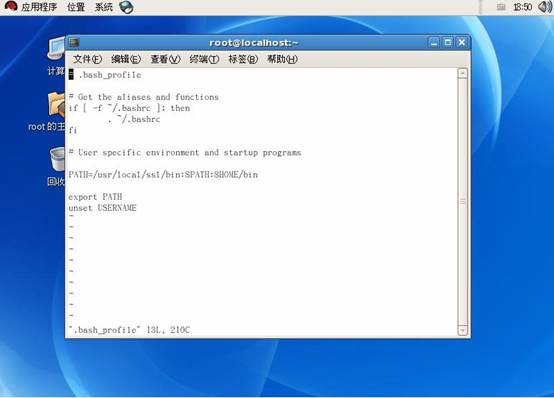
图2
Note that the older openssl, on most systems, is located under /usr/bin
The location of 'openssl' can be found with...(用下面的命令你就可以查到你的openssl的安装目录了~~~)
...]# which openssl
以上只是我在刚开始学习的时候的安装过程,若有不对的地方或还有更好的方法,欢迎大家批评指正~~~
此文章由 http://www.ositren.com 收集整理 ,地址为: http://www.ositren.com/htmls/61705.html
- [root@localhost /]# cd /usr/local
- ...]# cd /usr/local
- .../openssl-0.
- --prefix=/usr/local/ssl-
- Install to : /usr/local/ssl
- 在linux下解压缩下载到的安装包,命令如下.....