Raspberry Pi(树莓派)声音输出可以设置为自动,耳机输出,从HDMI输出三种,默认为自动
pi@aborn ~ $ sudo apt-get install alsa-utils
pi@aborn ~ $ sudo modprobe snd-bcm2835 #把声音模块加入内核
pi@aborn ~ $ sudo aplay /usr/share/sounds/alsa/Front_Center.wav
pi@aborn /opt/vc $ sudo amixer cset numid=3 2
numid=3,iface=MIXER,name='PCM Playback Route'
; type=INTEGER,access=rw------,values=1,min=0,max=2,step=0
: values=2
pi@aborn /opt/vc $ sudo aplay /usr/share/sounds/alsa/Front_Center.wav
Playing WAVE '/usr/share/sounds/alsa/Front_Center.wav' : Signed 16 bit Little Endian, Rate 48000 Hz, Mono
pi@aborn /opt/vc $ sudo amixer cset numid=3
numid=3,iface=MIXER,name='PCM Playback Route'
; type=INTEGER,access=rw------,values=1,min=0,max=2,step=0
: values=0
pi@aborn /opt/vc $ sudo amixer cset numid=3 1
numid=3,iface=MIXER,name='PCM Playback Route'
; type=INTEGER,access=rw------,values=1,min=0,max=2,step=0
: values=1
values取不同的值分别代表:
0=auto(自动), 1=headphones(耳机), 2=hdmi
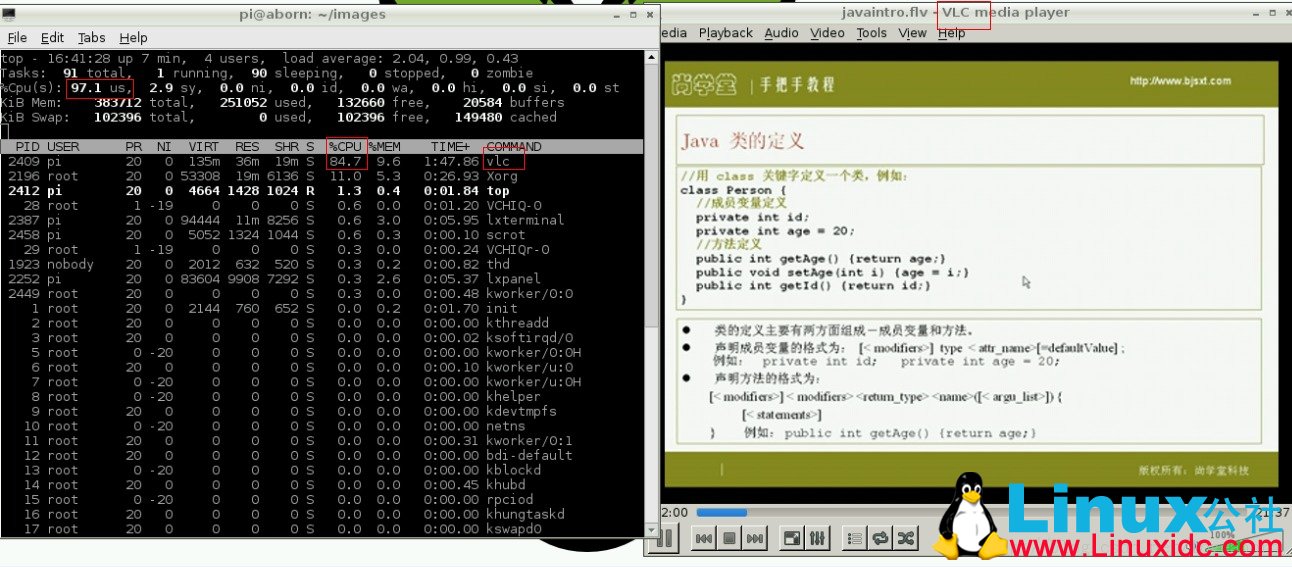
我发现播放视频的时候非常消耗cpu资源
参考:http://raspberrypi.stackexchange.com/questions/44/why-is-my-audio-sound-output-not-working
推荐阅读:
Raspberry Pi 树莓派搭LAMP服务器 http://www.linuxidc.com/Linux/2013-06/86687.htm
在树莓派Raspberry Pi上安装游戏模拟器 http://www.linuxidc.com/Linux/2013-07/86842.htm
Raspberry Pi 树莓派上安装Weston http://www.linuxidc.com/Linux/2013-06/86685.htm
用于Raspberry Pi 的Linux 操作系统已经可用 http://www.linuxidc.com/Linux/2012-03/56058.htm
Raspberry Pi(树莓派)试用小记 http://www.linuxidc.com/Linux/2013-10/91008.htm
Raspberry Pi(树莓派)的安装、配置IP及软件源等入门 http://www.linuxidc.com/Linux/2013-10/91009.htm
此文章由 http://www.ositren.com 收集整理 ,地址为: http://www.ositren.com/htmls/62936.html