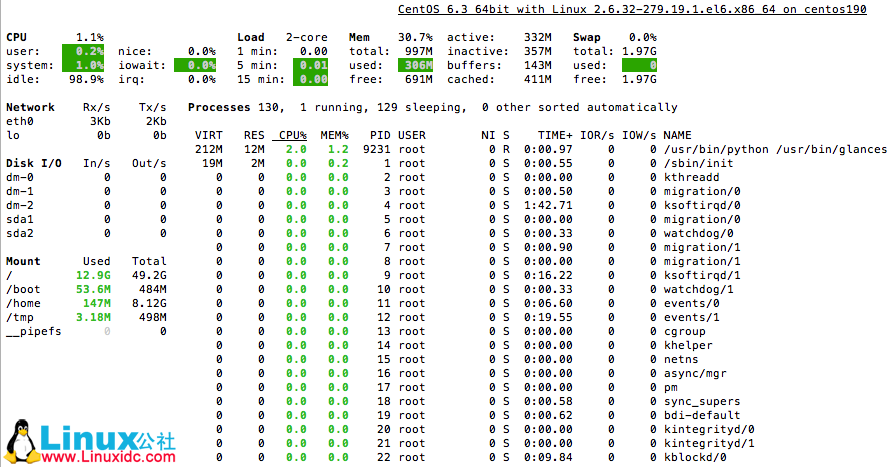
Linux系统监控实用工具Glances
Glances安装
Glances安装要求:python >= 2.6 和 psutil >= 0.4.1
# pip install psutil
# pip install pysensors
# pip install hddtemp
# git clone https://github.com/nicolargo/glances.git
# cd glances
# python setup.py install
Glances的使用
# glances -h
Glances version 1.7a with PsUtil 0.7.1
Usage: glances [opt]
 with opt:
	-b		Display network rate in Byte per second
	-B @IP|host	Bind server to the given IP or host NAME
	-c @IP|host	Connect to a Glances server
	-C file		Path to the configuration file
	-d		Disable disk I/O module
	-e		Enable the sensors module (Linux-only)
	-f file		Set the output folder (HTML) or file (CSV)
	-h		Display the syntax and exit
	-m		Disable mount module
	-n		Disable network module
	-o output	Define additional output (available: HTML or CSV)
	-p PORT		Define the client or server TCP port (default: 61209)
	-P password	Client/server password
	-r		Do not list processes (significant CPU use reduction)
	-s		Run Glances in server mode
	-t sec		Set the refresh time in seconds (default: 3)
	-v		Display the version and exit
	-y		Enable the hddtemp module (needs running hddtemp daemon)
	-z		Do not use the bold color attribute
	-1		Start Glances in per CPU mode
推荐阅读:
CentOS 6.3下Zabbix安装部署 http://www.linuxidc.com/Linux/2013-05/83786.htm
Zabbix分布式监控系统实践 http://www.linuxidc.com/Linux/2013-06/85758.htm
CentOS 6.3下Zabbix监控apache server-status http://www.linuxidc.com/Linux/2013-05/84740.htm
CentOS 6.3下Zabbix监控MySQL数据库参数 http://www.linuxidc.com/Linux/2013-05/84800.htm
此文章由 http://www.ositren.com 收集整理 ,地址为: http://www.ositren.com/htmls/63396.html